By Avatar JayR Cela
Well the rumor seem's to have been broken, if all goes well Phoenix FireStorm Beta 2 debut's this week.
Stay tuned here, I will more and likely be one of the first people to know.
JayR Cela :_)
Monday, July 4, 2011


Open Sim Month / July 4 thru 31 / "Phoenix FireStorm and Open SIm Together" "Coming Soon"
By Avatar JayR Cela
That's correct, the entire month of July, this blog will be devoted to understanding, and running Open Sim. With a few deviation's here and there back to SecondLife.
I am doing this as a labor of love, on one hand I love SecondLife, on the other hand I want to explore Open Sim. If you have been following the past few day's, you can obviously see that I am an Open Sim greenhorn. I really don't know what the heck I am doing yet. But I am learning really fast. I will continue these post's as long as it take's, to not only get myself up and running, but you as well.
Week 3 and 4 of July will be pretty much devoted to the Phoenix FireStorm Beta and how it work's with Open Sim.
And Rumor has it from a reliable source that Beta 2 is due to hit download status very, very soon. So stay tuned.
Also I am looking for contributor's to post Open Sim issue's, event's, news, how-to's etc...
If you would like to participate, just leave a comment or E-Mail me at JayR.Cela@gmail.com
JayR Cela :_)
That's correct, the entire month of July, this blog will be devoted to understanding, and running Open Sim. With a few deviation's here and there back to SecondLife.
I am doing this as a labor of love, on one hand I love SecondLife, on the other hand I want to explore Open Sim. If you have been following the past few day's, you can obviously see that I am an Open Sim greenhorn. I really don't know what the heck I am doing yet. But I am learning really fast. I will continue these post's as long as it take's, to not only get myself up and running, but you as well.
Week 3 and 4 of July will be pretty much devoted to the Phoenix FireStorm Beta and how it work's with Open Sim.
And Rumor has it from a reliable source that Beta 2 is due to hit download status very, very soon. So stay tuned.
Also I am looking for contributor's to post Open Sim issue's, event's, news, how-to's etc...
If you would like to participate, just leave a comment or E-Mail me at JayR.Cela@gmail.com
JayR Cela :_)
OpenSim "Installing an OAR Region File"
By Avatar JayR Cela
Well now that we have created our localhost OS Region ( Grid ) there are two choices you can make.

Either landscape it your self, or a much simpler way to get started is to download a pre-made OS Grid, or what is called an .OAR file. An .OAR file is short for an OpenSim Archive File. Here are some references
http://justincc.org/blog/2008/10/10/opensim-tech-basics-oars-opensim-region-archives/
http://opensimulator.org/wiki/OpenSim_Archives
http://opensimulator.org/wiki/OAR_Format_0.2
Now this is where things start to get a bit tricky, and again I gotta stress, I am just learning as I go along. Once you have downloaded an .OAR file you want to place a copy ( not a shortcut - keep the original as a backup ) into your opensim 0.7.1.1-bin < bin folder > in other words open the main opensim folder then inside of that folder locate and open the bin folder and place your copy of the .OAR file there. In this case the file is CondensationlandClub.oar


Ok, now that we have accomplished that, return to your console window ( DOS Prompt ) type help for a list of available commands. ( it's not a bad idea to copy & paste this list into a note card for easy reference later )


And type in at the prompt : Region < your new regions name > # load oar filename.oar
At this point you will see some activity on the console screen as it scrolls through the loading process, and shortly afterwards your new region ( Grid ) will magically assemble it's self.


If you are looking for .OAR file's they are very easy to find via your preferred search engine. < OpenSim OAR Files >
JayR Cela :_)
Well now that we have created our localhost OS Region ( Grid ) there are two choices you can make.

Either landscape it your self, or a much simpler way to get started is to download a pre-made OS Grid, or what is called an .OAR file. An .OAR file is short for an OpenSim Archive File. Here are some references
http://justincc.org/blog/2008/10/10/opensim-tech-basics-oars-opensim-region-archives/
http://opensimulator.org/wiki/OpenSim_Archives
http://opensimulator.org/wiki/OAR_Format_0.2
Now this is where things start to get a bit tricky, and again I gotta stress, I am just learning as I go along. Once you have downloaded an .OAR file you want to place a copy ( not a shortcut - keep the original as a backup ) into your opensim 0.7.1.1-bin < bin folder > in other words open the main opensim folder then inside of that folder locate and open the bin folder and place your copy of the .OAR file there. In this case the file is CondensationlandClub.oar


Ok, now that we have accomplished that, return to your console window ( DOS Prompt ) type help for a list of available commands. ( it's not a bad idea to copy & paste this list into a note card for easy reference later )


And type in at the prompt : Region < your new regions name > # load oar filename.oar
At this point you will see some activity on the console screen as it scrolls through the loading process, and shortly afterwards your new region ( Grid ) will magically assemble it's self.


If you are looking for .OAR file's they are very easy to find via your preferred search engine. < OpenSim OAR Files >
JayR Cela :_)
Open Sim Server "Computer Geek's Need Only Apply"
By Avatar JayR Cela
I am doing my best to try and provide some easy to understand, simple instruction's on setting up an Open Sim Server, and I will be the first one to admit, I really am just learning.
This has got to be one of the most frustrating experience's I have ever encountered. And I started using computer's in 1984 with an Atari 800. I would defiantly not recommend trying to install Open Sim Server on your main computer. Your safest bet is to use a spare. Something you don't care about if it screws up. Windows XP being 12 years old now will allow you to install as many copies as you like on as many different computers that you feel like installing it on. All you need is a legitimate copy, and once installed, validate it.
If your on Linux, you probably don't even need to be reading this. Yes I use Linux, but I am not an advanced user, and rely on the Gnome GUI to get my way around.
If anyone out there reading this blog is an experienced Open Sim Guru, and you would like to contribute, please by all mean's contact me JayR.Cela@gmail.com
JayR Cela :_)
I am doing my best to try and provide some easy to understand, simple instruction's on setting up an Open Sim Server, and I will be the first one to admit, I really am just learning.
This has got to be one of the most frustrating experience's I have ever encountered. And I started using computer's in 1984 with an Atari 800. I would defiantly not recommend trying to install Open Sim Server on your main computer. Your safest bet is to use a spare. Something you don't care about if it screws up. Windows XP being 12 years old now will allow you to install as many copies as you like on as many different computers that you feel like installing it on. All you need is a legitimate copy, and once installed, validate it.
If your on Linux, you probably don't even need to be reading this. Yes I use Linux, but I am not an advanced user, and rely on the Gnome GUI to get my way around.
If anyone out there reading this blog is an experienced Open Sim Guru, and you would like to contribute, please by all mean's contact me JayR.Cela@gmail.com
JayR Cela :_)
Open Sim "Warning !!!!!!" "INSTALL TO A SEPERATE PARTION OR HARD DRIVE !!!!"
By Avatar JayR Cela
I may be wrong, because quite frankly I don't have a clue as to what the hell I am doing yet. From what I can see so far, you defiantly need to install Open Sim on at the minimum a separate partition, have a good registry cleaner on hand, and probably a Linux boot disk with G-Parted on it to wipe the partition clean after you will most certainly screw things up.
Do Not Attempt To Install Open Sim Server On Your Main
Computer !!!! or Hard Drive
Again I may be way off base here with my assumption's, but I'm telling ya right now, this bastard is very difficult to remove, and star over with.
JayR Cela :(
Open Sim"Creation Of Your Own Grid" Let's Keep It Simple" "Part 1"
By Avatar JayR Cela
Ok, bear with me please, I am learning as I go along here. First thing is first, we want to keep this as simple as possible. So a localhost grid, in my mind seems as the best way to get out feet wet.
This series of post's will all be based on a Window's XP platform installation.
Things You Will Need :
#1 http://dist.opensimulator.org/opensim-0.7.1.1-bin.zip
#2 http://forge.opensimulator.org/gf/project/opensim-viewer/frs/
#1 is the Open Sim Server, which is used to create your new grid
#2 is the Hippo Open Sim Viewer, developed specifically for use in grids created by OpenSim server.
Ok once you have these, we will be ready to start.
Create a suitable directory on you hard drive, preferably it should be a dedicated HD partition, or an auxiliary 2nd hard disk, internal or external, does not matter.
In my case I have a separate partion G:\
You will unzip this file A2S34AF3RK7VJPU01OU0.zip
To your chosen location.
Open the opensim-0.7.1.1-bin folder

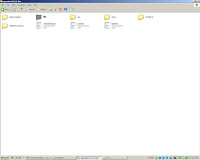

Find this file OpenSim, and RUN it, at this point you will be asked a series of questions, the only thing you need to do is follow the prompt's, make a region name, leave everything else set to their default's.
Region Location [1000,1000] :
Internal IP address [0,0,0,0]
Internal port [9000]
Allow alternate ports [False]
External host name [SYSTEMIP]

Next UnBlock the Window's FireWall

Then just continue to follow the prompt's

You will need to create a new Estate Name


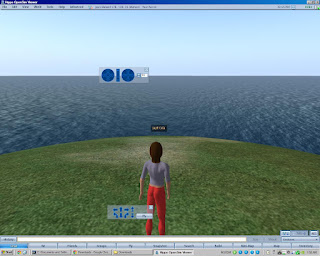
When it has finished installing, you will be greeted with a prompt with your new local regions name. This means that you have successfuly created a localhost grid on your computer.

So lets get the Hippo Viewer up and running.
On the Grid Selection Manager, you will need to choose Local.


And Wha-Laaa ! You will hopefully have arrived at your newly created private destination.
JayR Cela :_)
P.S. Some of these picture's above may not be in the correct order ( I blame that on Google Picasa ) and the fact I am extremely tired right now and need some sleep, but I believe with a little common sense, you should be able to figure it out
Ok, bear with me please, I am learning as I go along here. First thing is first, we want to keep this as simple as possible. So a localhost grid, in my mind seems as the best way to get out feet wet.
This series of post's will all be based on a Window's XP platform installation.
Things You Will Need :
#1 http://dist.opensimulator.org/opensim-0.7.1.1-bin.zip
#2 http://forge.opensimulator.org/gf/project/opensim-viewer/frs/
#1 is the Open Sim Server, which is used to create your new grid
#2 is the Hippo Open Sim Viewer, developed specifically for use in grids created by OpenSim server.
Ok once you have these, we will be ready to start.
Create a suitable directory on you hard drive, preferably it should be a dedicated HD partition, or an auxiliary 2nd hard disk, internal or external, does not matter.
In my case I have a separate partion G:\
You will unzip this file A2S34AF3RK7VJPU01OU0.zip
To your chosen location.
Open the opensim-0.7.1.1-bin folder


Find this file OpenSim, and RUN it, at this point you will be asked a series of questions, the only thing you need to do is follow the prompt's, make a region name, leave everything else set to their default's.
Region Location [1000,1000] :
Internal IP address [0,0,0,0]
Internal port [9000]
Allow alternate ports [False]
External host name [SYSTEMIP]

Next UnBlock the Window's FireWall

Then just continue to follow the prompt's

You will need to create a new Estate Name
Then an Estate Owner first name
Then a Last Name
Then a password
Then enter your E-Mail Address


When it has finished installing, you will be greeted with a prompt with your new local regions name. This means that you have successfuly created a localhost grid on your computer.

So lets get the Hippo Viewer up and running.
On the Grid Selection Manager, you will need to choose Local.


And Wha-Laaa ! You will hopefully have arrived at your newly created private destination.

JayR Cela :_)
P.S. Some of these picture's above may not be in the correct order ( I blame that on Google Picasa ) and the fact I am extremely tired right now and need some sleep, but I believe with a little common sense, you should be able to figure it out
Sunday, July 3, 2011
OpenSim "Creation Of Your Own Grid" "Lack Of Simple Instruction's Inhibit Growth"
By Avatar JayR Cela
Well it seems like just about everyone in the OpenSim world, except me know's what the heck to do in order to create your own grid. And let me tell ya, it is confusing as hell. It took me most of the weekend and a lot of hair pulling to finally get a localhost region to load, then came the loading of a freely available .OAR file.
So this really piss's me off. This is not an easy thing to do, but I intend to at least try and publish some simple instruction's to get you up and running at least a localhost grid, and hopefully in the future one that is available to other people as well.
First off, the resources assume that you are a propeller head computer geek. In my opinion this is the major stumbling block to the actual acceptance of OpenSim as a usable platform for the average person.
In order to keep this simple I will be using Windows XP, and Part 1 will start completely from scratch.
JayR :_)
Well it seems like just about everyone in the OpenSim world, except me know's what the heck to do in order to create your own grid. And let me tell ya, it is confusing as hell. It took me most of the weekend and a lot of hair pulling to finally get a localhost region to load, then came the loading of a freely available .OAR file.
So this really piss's me off. This is not an easy thing to do, but I intend to at least try and publish some simple instruction's to get you up and running at least a localhost grid, and hopefully in the future one that is available to other people as well.
First off, the resources assume that you are a propeller head computer geek. In my opinion this is the major stumbling block to the actual acceptance of OpenSim as a usable platform for the average person.
In order to keep this simple I will be using Windows XP, and Part 1 will start completely from scratch.
JayR :_)
Friday, July 1, 2011
Open Sim~OSgrid "Gathering A Texture Library"
By Avatar JayR Cela
Well there is no doubt about it, if you are a builder, you can never have too many textures. Now I am not a graphic's design artist, so I depend upon freely available textures when I am designing and building custom home's. I found a place that has a ton of free textures. That's a good thing, however you must take one at a time, making it a rather lengthy process. Plan on setting an entire day aside if you are going to do this.
Now I have not figured out how to create a SLUR here on OSgrid yet so I will just give you the name of the place, and its location.


As you can see this is going to be an all day job, but it will pay off in the long run. So if you are a builder, you will most defiantly want to stop on by Snoopies Freebies Shopping located on the Samsara sim ( Samsara 186,44,22 )
Anyways I managed to get all of the Wood Textures this morning, after a painstaking and extremely boring afternoon, I finally managed to package all of them into 1 box that I will be able to give freely in the future to people that need them.

Then a Stone Texture Box, and on and on and on. Eventually I will have enough in order to be able to pass them along to folk's so they wont have to go through this tedious process.
JayR Cela :_)
Well there is no doubt about it, if you are a builder, you can never have too many textures. Now I am not a graphic's design artist, so I depend upon freely available textures when I am designing and building custom home's. I found a place that has a ton of free textures. That's a good thing, however you must take one at a time, making it a rather lengthy process. Plan on setting an entire day aside if you are going to do this.
Now I have not figured out how to create a SLUR here on OSgrid yet so I will just give you the name of the place, and its location.


As you can see this is going to be an all day job, but it will pay off in the long run. So if you are a builder, you will most defiantly want to stop on by Snoopies Freebies Shopping located on the Samsara sim ( Samsara 186,44,22 )
Anyways I managed to get all of the Wood Textures this morning, after a painstaking and extremely boring afternoon, I finally managed to package all of them into 1 box that I will be able to give freely in the future to people that need them.

Then a Stone Texture Box, and on and on and on. Eventually I will have enough in order to be able to pass them along to folk's so they wont have to go through this tedious process.
JayR Cela :_)
Open Sim~OSgrid "Switching Operating Systems"
By Avatar JayR Cela
Well I seem to have been able to get Windows XP to cooperate with the Singularity and Imprudence viewer's. I did need to re-log several times and I did not have to use my back up Cache's. So this has got me wondering, just where and the heck is my inventory stored at ?
Oh well, I'm not going to worry over it, right now I'm going to see if I can switch my OS back to Linux, I really can't stand working in a Windows environment.
I'll be using Ubuntu Studio 10.04 32 bit on an ageing home built AMD 64, I gig memory, with a Nvidia 7300GT 512MB, so this sucker is pretty old, but it should be able to adequately get the job done.
From here on out I intend to use the Imprudence Viewer, seems as if just about everyone I have met on OSgrid so far are using it, so I may as well too.
JayR Cela :_)
Well I seem to have been able to get Windows XP to cooperate with the Singularity and Imprudence viewer's. I did need to re-log several times and I did not have to use my back up Cache's. So this has got me wondering, just where and the heck is my inventory stored at ?
Oh well, I'm not going to worry over it, right now I'm going to see if I can switch my OS back to Linux, I really can't stand working in a Windows environment.
I'll be using Ubuntu Studio 10.04 32 bit on an ageing home built AMD 64, I gig memory, with a Nvidia 7300GT 512MB, so this sucker is pretty old, but it should be able to adequately get the job done.
From here on out I intend to use the Imprudence Viewer, seems as if just about everyone I have met on OSgrid so far are using it, so I may as well too.
JayR Cela :_)
Open Sim~OSgrid "Switching Viewers"
By Avatar JayR Cela
Ok here's the deal, I am a new OSgrid user, and I do not own any land, in other word's I am unable to create an .iar ( back-up ) file of my avatar's inventory. I know this sound's a bit odd, but apparently this seemingly simple thing may end up causing me to loose everything I have done within the past 2 day's. So I fire up the Imprudence viewer, and point it to seek out my cache to D:\SingCache ( the location of my Singularity viewers OSg cache location.


Oh-Oh, major warning bell's go off, yes any time you make a change to the viewer cache location, all viewers will automatically clear it.
So I am taking two percaution's, first I am making a copy ( backup ) of the current D:\SingCache directory, and I will also use the Windows System Restore feature.

At this point I believe I should have my ass sufficiently covered.
Call me paranoid if you like, but the prospect of loosing two days worth of avatar free-bee shopping, and having to start over completely bum's me right out :(
Ok I made the switch, pretty much intact without having to use my backup Cache, LOL now I' really confused, just where and the heck is my inventory stored at ?
Ok here's the deal, I am a new OSgrid user, and I do not own any land, in other word's I am unable to create an .iar ( back-up ) file of my avatar's inventory. I know this sound's a bit odd, but apparently this seemingly simple thing may end up causing me to loose everything I have done within the past 2 day's. So I fire up the Imprudence viewer, and point it to seek out my cache to D:\SingCache ( the location of my Singularity viewers OSg cache location.


Oh-Oh, major warning bell's go off, yes any time you make a change to the viewer cache location, all viewers will automatically clear it.
So I am taking two percaution's, first I am making a copy ( backup ) of the current D:\SingCache directory, and I will also use the Windows System Restore feature.

At this point I believe I should have my ass sufficiently covered.
Call me paranoid if you like, but the prospect of loosing two days worth of avatar free-bee shopping, and having to start over completely bum's me right out :(
Ok I made the switch, pretty much intact without having to use my backup Cache, LOL now I' really confused, just where and the heck is my inventory stored at ?
Subscribe to:
Posts (Atom)